
[all / search] [a / b / c / d / e / f / g / gif / h / hr / k / m / o / p / r / s / t / u / v / vg / vm / vmg / vr / vrpg / vst / w / wg] [i / ic / oc] [r9k / s5s / vip / q] [cm / hm / lgbt / y] [3 / aco / adv / an / bant / biz / cgl / ck / co / diy / fa / fit / gd / hc / his / int / jp / lit / mlp / mu / n / news / out / po / pol / pw / qst / sci / soc / sp / tg / toy / trv / tv / vp / vt / wsg / wsr / x / xs] [trash] [Search] [Home]
Board

Pasting Images into the Comment Box

/q/ - 5chan Feedback · 5chan-feedback.bso


[Return] [Catalog] [Bottom]2 / 0
Return Catalog Bottom

File: Screenshot_2026-11-02_14-21-17.png (image, 520x319)
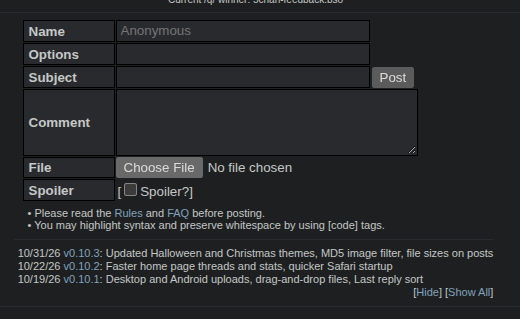
Always found it really handy to be able to take a screenshot or copy an image, and directly paste it into the comment box.

Forget whether it's native on 4chan, or a 4chanX feature.

Saves lots of time as opposed to
>save something
>click chooose file
>where the fuck did it save to?
>shit, was it 23525324324.jpg or 235349503294.jpg?
>ahhh fuck it.

>>
>>33 (OP)
Good idea, adding it to v0.10.4, thanks for the suggestion.
You'll be able to paste a copied image, screenshot or file into the comment field and it gets attached automatically as the post’s file, same as Choose File.
BTW, dragging a file onto the form already works.
>>
>>34
Amazing stuff. Thanks.

Cheers for the heads up about the dragging. Actually quite useful in saving a bit of time as you can drag images from pages across tabs.

image
Always found it really handy to be able to take a screenshot or copy an image, and directly paste it into the comment box.

Forget whether it's native on 4chan, or a 4chanX feature.

Saves lots of time as opposed to
>save something
>click chooose file
>where the fuck did it save to?
>shit, was it 23525324324.jpg or 235349503294.jpg?
>ahhh fuck it.

>>34
>>33 (OP)
Good idea, adding it to v0.10.4, thanks for the suggestion.
You'll be able to paste a copied image, screenshot or file into the comment field and it gets attached automatically as the post’s file, same as Choose File.
BTW, dragging a file onto the form already works.
>>35
>>34
Amazing stuff. Thanks.

Cheers for the heads up about the dragging. Actually quite useful in saving a bit of time as you can drag images from pages across tabs.